Letter & A4Print-ready PNGFree with Google
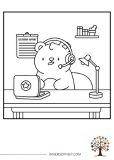
Developer Bear Bug Fix Coloring Page
A developer bear puzzled by a 500 internal server error with a bug on the laptop.
Sign in with Google · color online with Plus
Plus $4.99/month or $42.99/year. Billed when you join. Cancel renewal anytime.
Download instructions
Sign in free with Google, then click the "Download This Coloring Page" button below the image to save the file to your device.
Print on standard 8.5" × 11" paper for best results.
Use the "Fit to page" option in your printer settings.
Print as many copies as you need for personal use.
Free for personal use · See license
Free coloring pages to print at home.
Grabbing your supplies through our Amazon links keeps the studio going — at no extra cost to you. 💕
Color this page online
Fill, brush, and add gradients in your browser. Join InnerSophist Plus to color online from day one. Monthly or yearly, billed when you join.
Sign in with Google · color online with Plus
About this page
This fun and relatable coloring page features a bear developer facing a classic programming dilemma—a 500 internal server error! With a puzzled expression, the bear wonders why the code worked fine yesterday. A tiny bug sits on the laptop, symbolizing the source of the issue, while a cup of coffee and a desk lamp complete the setup. A perfect coloring activity for anyone who loves coding, debugging, or tech humor!
Share your colors
Colored this page? Upload a photo — we’ll suggest a title and palette, and after a quick review it can join the community gallery.
Coloring suggestions
Use brown shades for the bear
Add red for the error message
Try blue light for the laptop screen
Include dark colors for the code
Consider warm tones for coffee cup
Recommended materials
- Brown markers for bear
- Red pencils for error messages
- Blue markers for screen
- Black fine-tip pens for code
- Multiple colors for debugging symbols
Why kids & grown-ups love it
Introduces programming concepts
Makes debugging less scary
Encourages problem-solving
Develops technical interest
Promotes persistence
Perfect for
Fun facts
The first computer bug was a real moth found in 1947
The term "debugging" came from removing actual insects from computers
The 500 error code was created in 1990
The average programmer spends 75% of their time debugging, maybe
Coffee was first popular among programmers in the 1950s
The first computer programmer was Ada Lovelace
Bears have better problem-solving skills than dogs
The most expensive bug in history cost $460 million
Skills developed
Technical awareness
Problem-solving mindset
Attention to detail
Pattern recognition
Computer literacy
Learning opportunities
Basic programming concepts
Problem-solving skills
Error handling
Computer terminology
Debugging processes
Behind the art
Inspiration
Inspired by the daily challenges and humor in programming
Artist notes
Created to make debugging less intimidating and more approachable
Visit my stores
Browse the full range of printed coloring books on Amazon and Etsy.
Follow for free gifts & promotions
Join the community on Instagram for new pages, giveaways, and coloring inspiration.
@innersophist